The 4th Brain Recipe for Managing Events in Obsidian
Because moments worth remembering deserve their own special space in your PKM
· Personal knowledge management
Project: 4th Brain is an Integrated Intelligence Ecosystem developed by a community of artists, digital creators and knowledge workers who collaborate to create and share standards and tools for Personal Knowledge Management (PKM). In this article, we share our current recipe for managing events in Obsidian (Current and Future Events, Recurring Events, Birthdays, Past Events, and Cancelled Events).
Last Modified: May 9, 2025
The End Result: An Events Framework in Obsidian
With this recipe, you can track and report on key events in your life. This framework is not intended to replace the day-to-day utility of a calendar, but rather, it is meant to help you integrate key life events and related event information into your Personal Knowledge Management (PKM) system. This can help you find signals amongst the noise of your day-to-day work and it can help you record and integrate information about the moments that truly matter.
With this framework, you will be able to create new Events from a template, store them in a logical set of recommended folders, and report on them using Dataview queries.
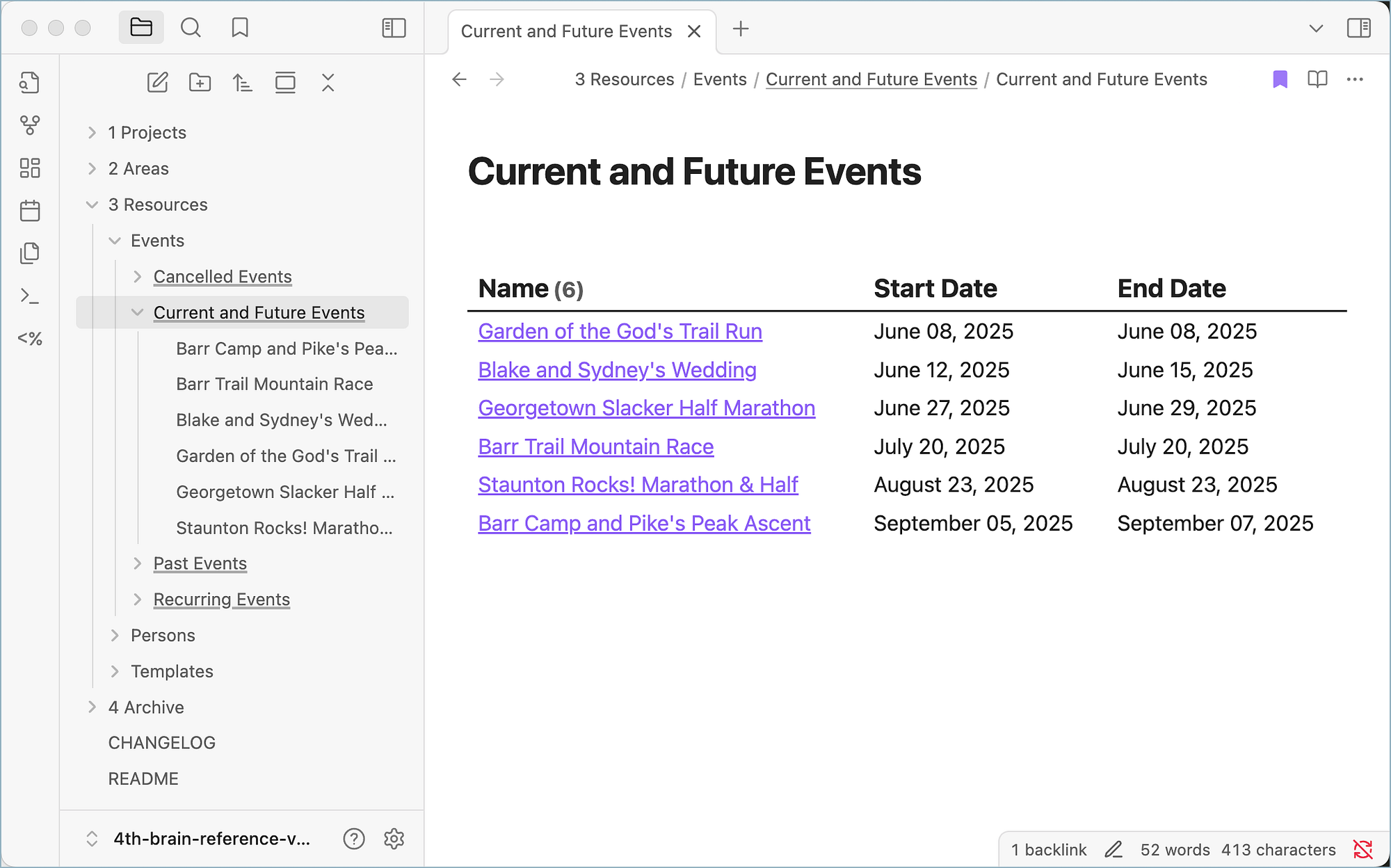
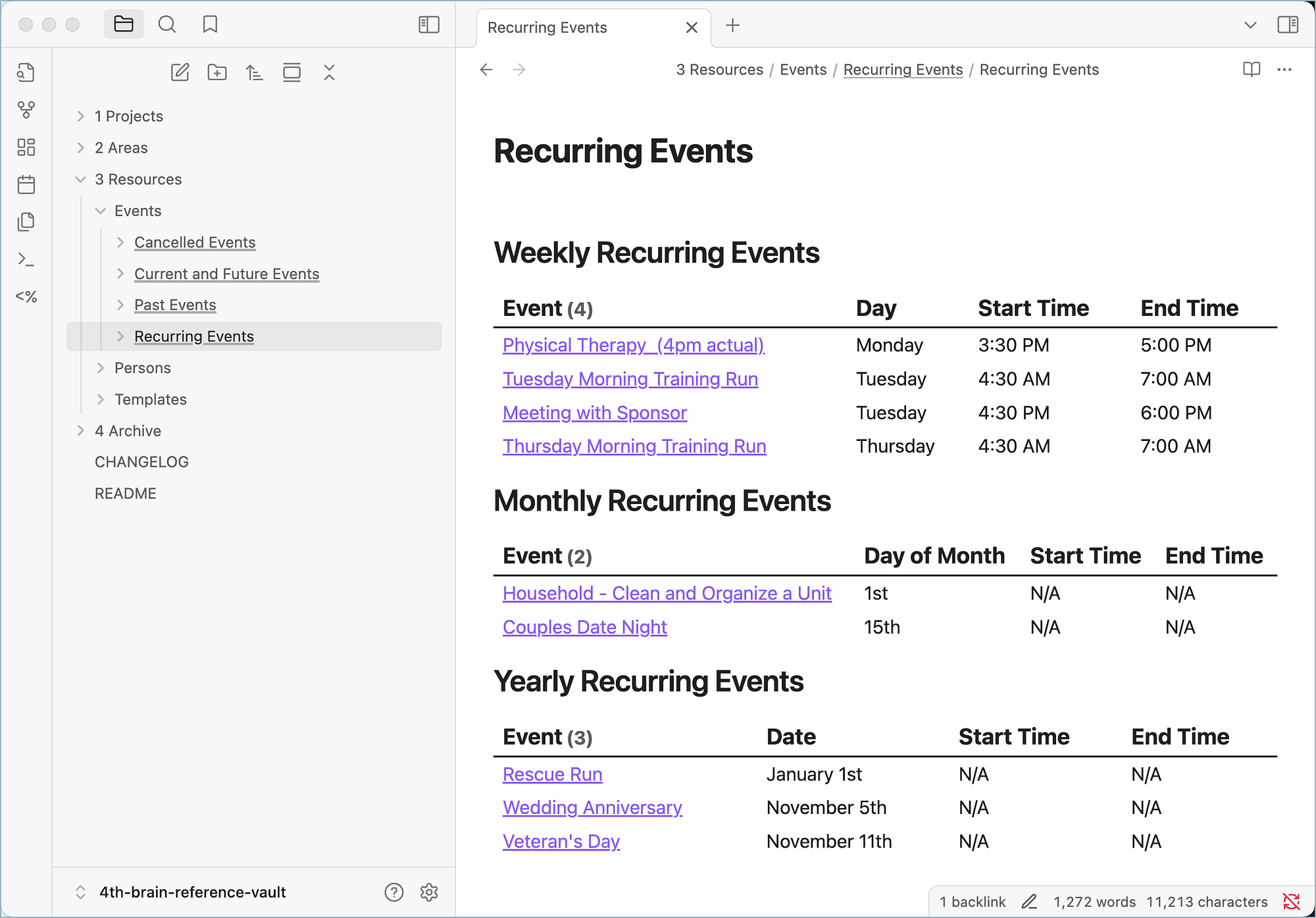
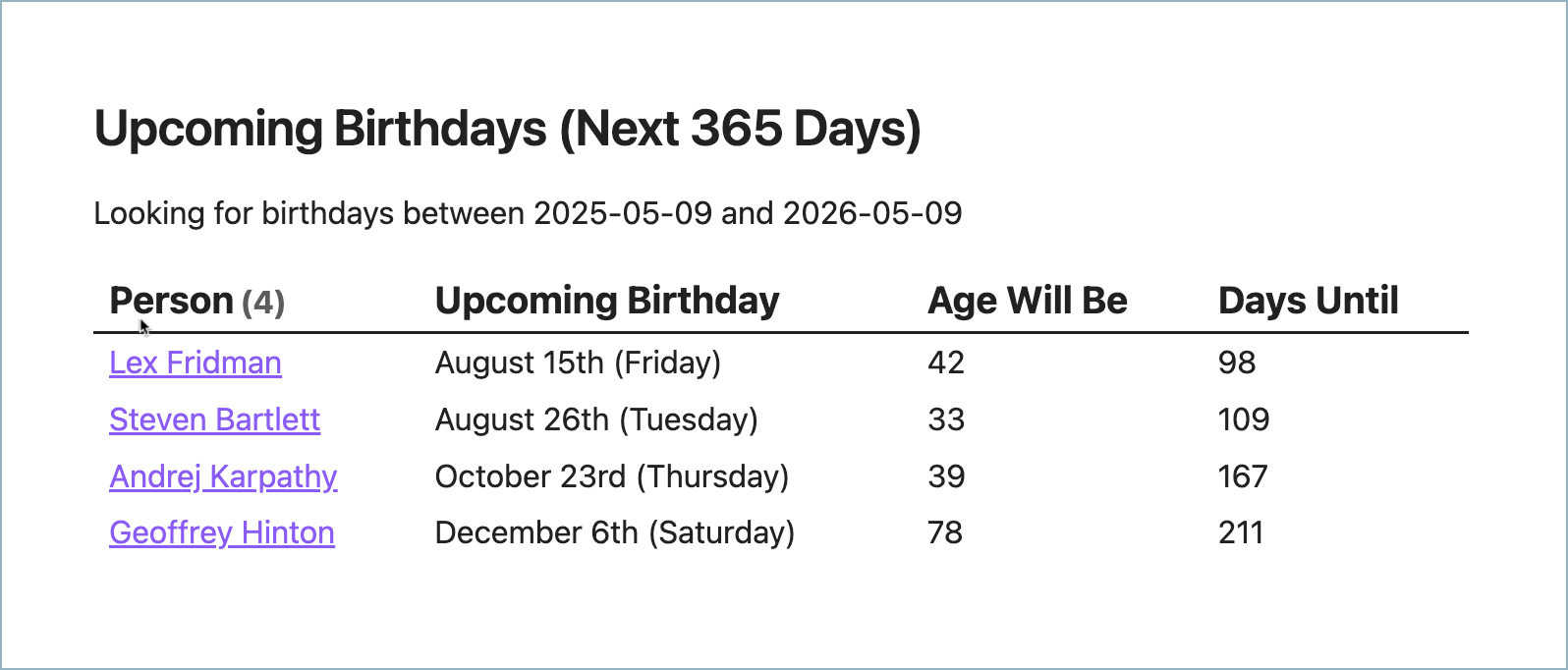
⭐️️️️️️ This recipe is implemented in the 4th Brain Reference Vault for Obsidian, available on GitHub; fork and pull the repository or download the latest release here.
Folders
Our root folder structure follows the PARA Method pattern for PKM, which is optional in this recipe.
- 📁 1 Projects
- 📁 2 Areas
- 📁 3 Resources
- 📁 4 Archive
Within the 3 Resources folder, we have the following folders for event documents (documents created using Template − Event).
-
📁 Events
- 📁 Cancelled Events
- 📁 Current and Future Events
- 📁 Past Events
- 📁 Recurring Events
Within the Recurring Events folder, we have the following sub-folders.
- 📁 Monthly
- 📁 Weekly
- 📁 Yearly
These sub-folders are not strictly necessary because the Dataview queries we use to select documents are based on document properties and not the folders; still, we think they help keep event documents better organized and easier to manage.
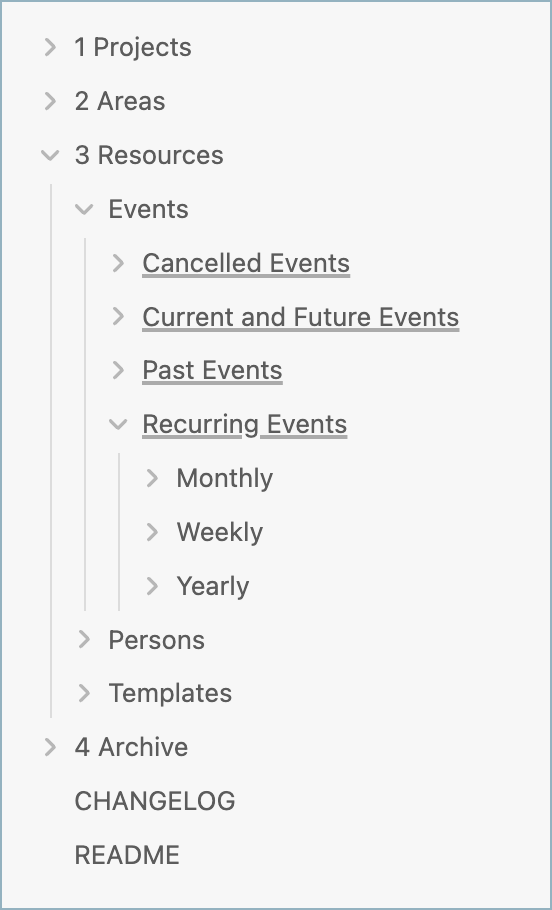
Here’s what all the folders look like together in our reference vault:
Templates
We store all templates in 3 Resources/Templates. You’ll need a template for Event, of course. If you want to support reporting on birthdays, you’ll also want a template for a Person. Following are the properties you’ll want in each.
Template − Event
Create a template named “Template − Event.md” with the following properties.
template: "[[Template - Event]]"
startDate:
endDate:
startTime:
endTime:
weeklyRecurDay:
monthlyRecurDay:
yearlyRecurMonth:
yearlyRecurDay:
Template − Person
Create a template named “Template − Person” with the following recommended properties (birthday is the only required property in this case).
template: "[[Template - Person]]"
givenName:
familyName:
jobTitle:
email:
email2:
telephone:
streetAddress:
city:
stateOrProvince:
postalCode:
country:
birthday:
Required Obsidian Plugins
You’ll need the following Obsidian community plugins installed.
Obsidian Dataview by Michael Brenan
“Treat your Obsidian Vault
as a database which you can query from. Provides a JavaScript API
and pipeline-based query language for filtering, sorting, and
extracting data from Markdown pages.”
This is what we use to query and report on the various kinds of events-sorting them for display.
Obsidian Folder Notes by Lost Paul
“Folder notes is a plugin for
the note taking app Obsidian that lets you attach notes to folders
so that you can click on the name of a folder to open the note like
in the app Notion. This plugin has some unique features that
separate it from similar ‘Folder note’ plugins like opening folder
notes through the path, creating folder notes for every existing
folder, templater/template support and more.”
This allows you to click on event folders to open the folder notes, which are Map of Content (MoC) pages that have the Dataview reports on them.
Templater by SilentVoid
“Templater is a template
plugin for Obsidian.md. It defines a templating language that lets
you insert variables and functions results into your notes. It will
also let you execute JavaScript code manipulating those variables
and functions.”
This plugin allows us to right-click on Event folders and select Create new note from template-allowing us to conveniently choose Template − Event when creating new events.
Folder Note Dataview Queries
Finally, configure Dataview queries on the appropriate folder notes.
Current and Future Events
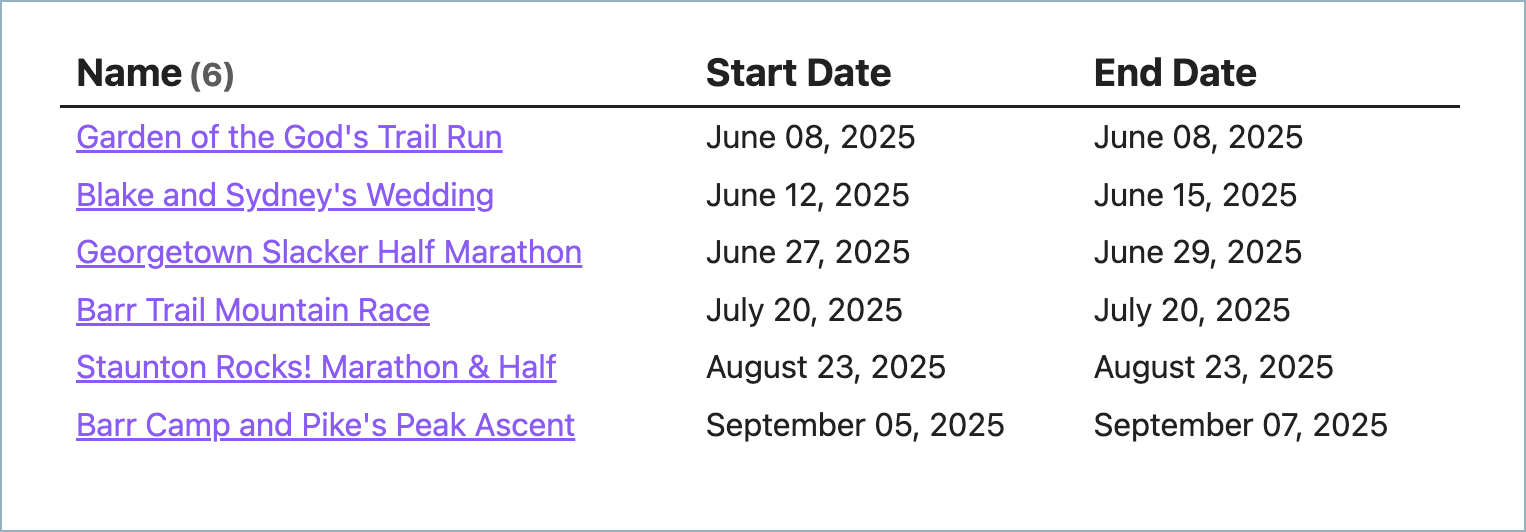
```dataviewjs
const today = DateTime.now();
dv.table(["Name","Start Date", "End Date"],
 dv.pages()
     .sort(doc => [ doc.endDate ], 'asc')
  .where(doc =>
   doc.file.name != "Template - Event" &&
   doc.template?.path?.includes("Template - Event")
  )
  .where(doc => doc.endDate && doc.endDate >= dv.date(today))
  .map(doc =>
   [
    doc.file.link,
    doc.startDate,
    doc.endDate,
   ])
    )
```
Past Events
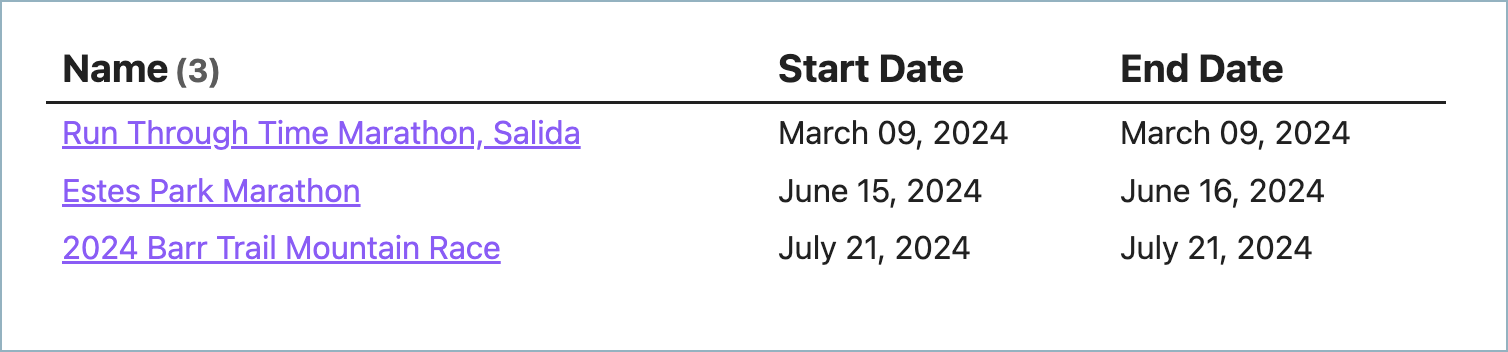
```dataviewjs
const today = DateTime.now();
dv.table(["Name","Start Date", "End Date"],
 dv.pages()
     .sort(doc => [ doc.endDate ], 'asc')
  .where(doc =>
   doc.file.name != "Template - Event" &&
   doc.template?.path?.includes("Template - Event")
  )
  .where(doc => doc.endDate && doc.endDate < dv.date(today))
  .map(doc =>
   [
    doc.file.link,
    doc.startDate,
    doc.endDate,
   ])
    )
```
Recurring Events
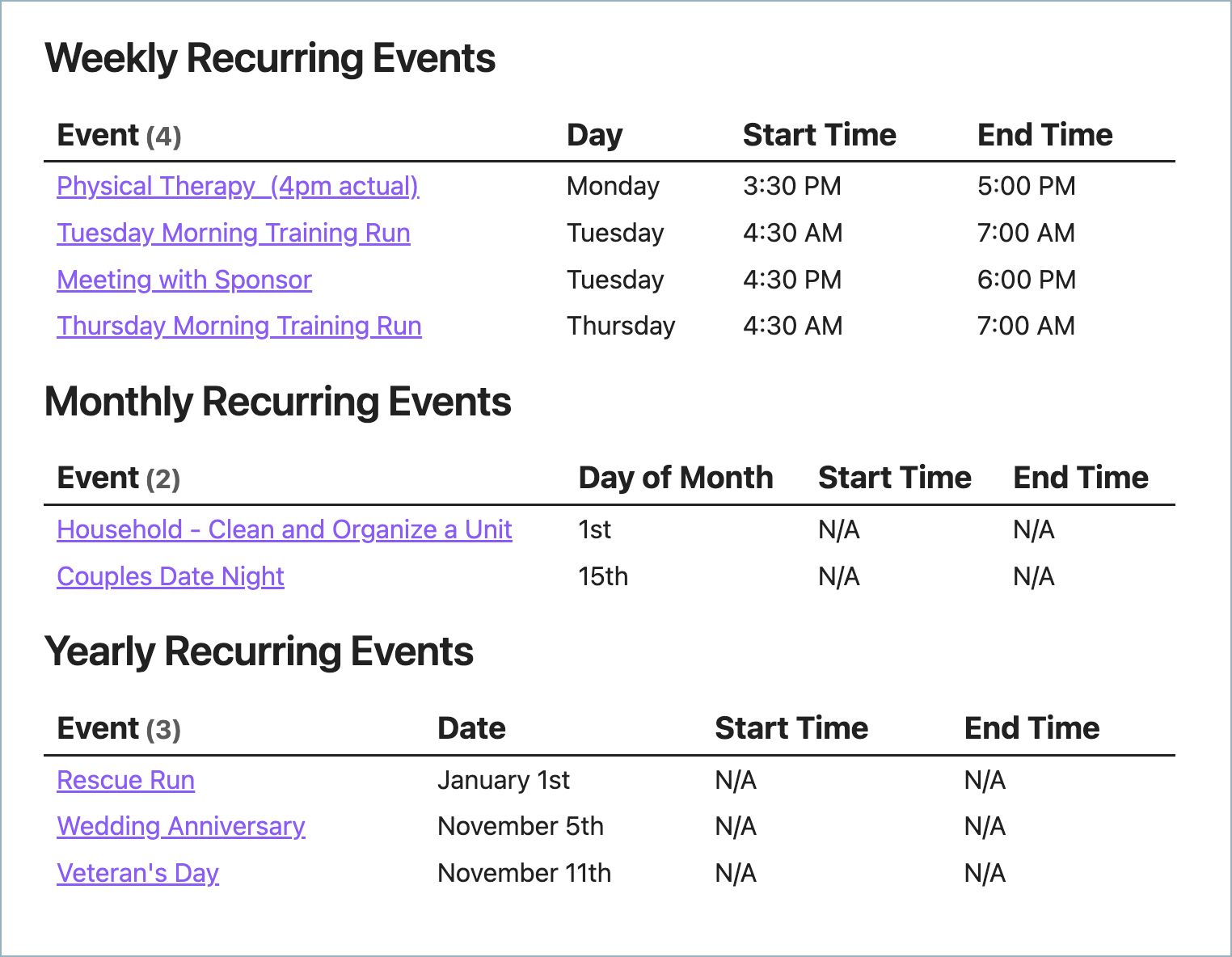
```dataviewjs
// Get today's date
const today = DateTime.now();

// Function to convert 24h time to 12h time with AM/PM
function formatTime12h(time24h) {
    if (!time24h || time24h === "N/A") return "N/A";

    // Parse the hour and minute
    const [hours, minutes] = time24h.split(':').map(num => parseInt(num, 10));

    if (isNaN(hours) || isNaN(minutes)) return time24h;

    // Convert to 12-hour format
    const period = hours >= 12 ? "PM" : "AM";
    const hours12 = hours % 12 || 12; // Convert 0 to 12 for 12 AM

    // Format as "1:30 PM" etc.
    return `${hours12}:${minutes.toString().padStart(2, '0')} ${period}`;
}

// Helper function for ordinal suffixes
function getOrdinalSuffix(day) {
    if (typeof day === 'string') day = parseInt(day);
    if (isNaN(day)) return '';

    if (day % 10 === 1 && day % 100 !== 11) return 'st';
    if (day % 10 === 2 && day % 100 !== 12) return 'nd';
    if (day % 10 === 3 && day % 100 !== 13) return 'rd';
    return 'th';
}

// ========== WEEKLY EVENTS ==========
dv.header(2, "Weekly Recurring Events");

// Get all files in the Weekly folder
const weeklyEvents = dv.pages()
    .where(p => p.weeklyRecurDay);

// Map of day numbers to names for sorting and display
const dayNames = ["Sunday", "Monday", "Tuesday", "Wednesday", "Thursday", "Friday", "Saturday"];
const dayMap = {};
dayNames.forEach((name, index) => {
    dayMap[name.toLowerCase()] = index;
});

// Sort events by day of week and start time
const sortedWeekly = weeklyEvents.sort(p => [
    // Sort by day number
    p.weeklyRecurDay ? (typeof p.weeklyRecurDay === 'number' ? p.weeklyRecurDay : dayMap[p.weeklyRecurDay.toLowerCase()]) : 7,
    // Then by start time
    p.startTime || "23:59"
]);

// Render the table
dv.table(["Event", "Day", "Start Time", "End Time"],
    sortedWeekly.map(p => [
        p.file.link,
        p.weeklyRecurDay,
        formatTime12h(p.startTime),
        formatTime12h(p.endTime)
    ])
);

// ========== MONTHLY EVENTS ==========
dv.header(2, "Monthly Recurring Events");

// Get all files in the Monthly folder
const monthlyEvents = dv.pages()
    .where(p => p.monthlyRecurDay);

// Sort events by day of month and start time
const sortedMonthly = monthlyEvents.sort(p => [
    // Sort by day of month
    parseInt(p.monthlyRecurDay) || 32,
    // Then by start time
    p.startTime || "23:59"
]);

// Render the table
dv.table(["Event", "Day of Month", "Start Time", "End Time"],
    sortedMonthly.map(p => [
        p.file.link,
        p.monthlyRecurDay ? (p.monthlyRecurDay + getOrdinalSuffix(p.monthlyRecurDay)) : "N/A",
        formatTime12h(p.startTime),
        formatTime12h(p.endTime)
    ])
);

// ========== YEARLY EVENTS ==========
dv.header(2, "Yearly Recurring Events");

// Get all files in the Yearly folder
const yearlyEvents = dv.pages('"3 Resources/Events/Recurring Events/Yearly"')
    .where(p => p.recurMonth && p.recurDay);

// Month names for sorting and display
const monthNames = ["January", "February", "March", "April", "May", "June", "July", "August", "September", "October", "November", "December"];
const monthMap = {};
monthNames.forEach((name, index) => {
    monthMap[name.toLowerCase()] = index;
});

// Sort events by month, day and start time
const sortedYearly = yearlyEvents.sort(p => [
    // Sort by month number
    p.recurMonth ? (typeof p.recurMonth === 'number' ? p.recurMonth - 1 : monthMap[p.recurMonth.toLowerCase()]) : 12,
    // Then by day
    parseInt(p.recurDay) || 32,
    // Then by start time
    p.startTime || "23:59"
]);

// Render the table
dv.table(["Event", "Date", "Start Time", "End Time"],
    sortedYearly.map(p => {
        // Format the date as "Month Day"
        let monthDisplay = p.recurMonth;
        if (typeof p.recurMonth === 'number') {
            monthDisplay = monthNames[p.recurMonth - 1];
        }

        let dateDisplay = monthDisplay + " " + p.recurDay;
        if (p.recurDay) {
            dateDisplay += getOrdinalSuffix(p.recurDay);
        }

        return [
            p.file.link,
            dateDisplay,
            formatTime12h(p.startTime),
            formatTime12h(p.endTime)
        ];
    })
);
```
Upcoming Birthdays
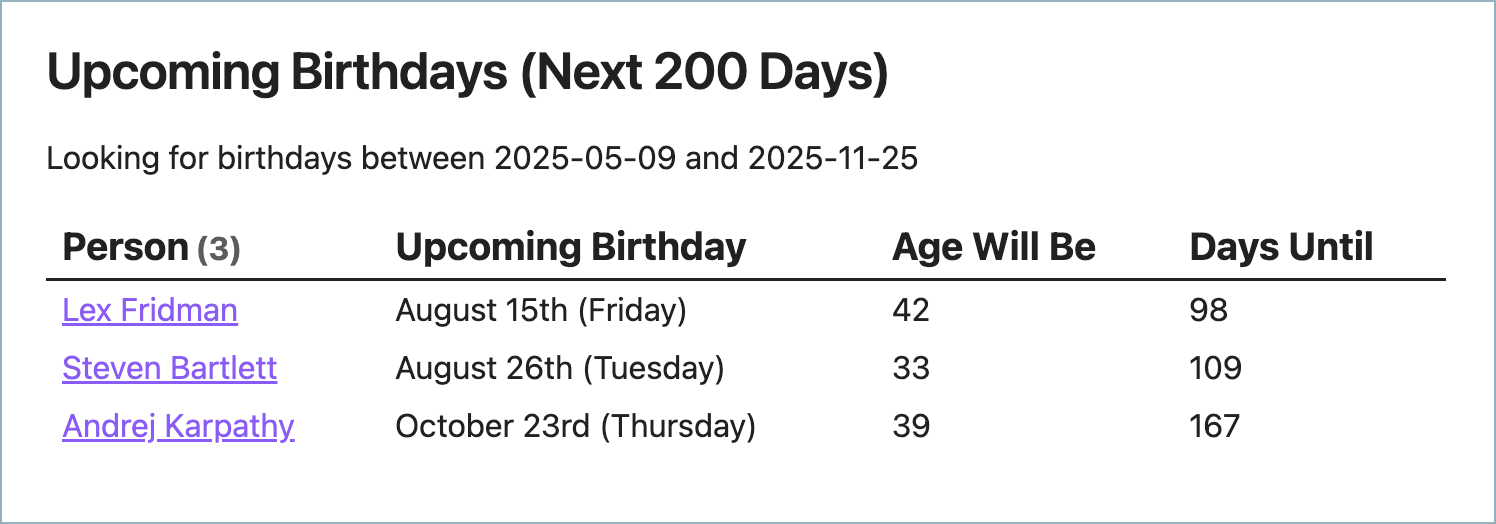
Change the value of the daysAhead variable at the top of this script to change how far you want to look ahead (to change what you define as “upcoming,” that is).
```dataviewjs
// Get today's date
const today = DateTime.now();

// Function to convert 24h time to 12h time with AM/PM
function formatTime12h(time24h) {
    if (!time24h || time24h === "N/A") return "N/A";

    // Parse the hour and minute
    const [hours, minutes] = time24h.split(':').map(num => parseInt(num, 10));

    if (isNaN(hours) || isNaN(minutes)) return time24h;

    // Convert to 12-hour format
    const period = hours >= 12 ? "PM" : "AM";
    const hours12 = hours % 12 || 12; // Convert 0 to 12 for 12 AM

    // Format as "1:30 PM" etc.
    return `${hours12}:${minutes.toString().padStart(2, '0')} ${period}`;
}

// Helper function for ordinal suffixes
function getOrdinalSuffix(day) {
    if (typeof day === 'string') day = parseInt(day);
    if (isNaN(day)) return '';

    if (day % 10 === 1 && day % 100 !== 11) return 'st';
    if (day % 10 === 2 && day % 100 !== 12) return 'nd';
    if (day % 10 === 3 && day % 100 !== 13) return 'rd';
    return 'th';
}

// ========== WEEKLY EVENTS ==========
dv.header(2, "Weekly Recurring Events");

// Get all files in the Weekly folder
const weeklyEvents = dv.pages()
    .where(p => p.weeklyRecurDay);

// Map of day numbers to names for sorting and display
const dayNames = ["Sunday", "Monday", "Tuesday", "Wednesday", "Thursday", "Friday", "Saturday"];
const dayMap = {};
dayNames.forEach((name, index) => {
    dayMap[name.toLowerCase()] = index;
});

// Sort events by day of week and start time
const sortedWeekly = weeklyEvents.sort(p => [
    // Sort by day number
    p.weeklyRecurDay ? (typeof p.weeklyRecurDay === 'number' ? p.weeklyRecurDay : dayMap[p.weeklyRecurDay.toLowerCase()]) : 7,
    // Then by start time
    p.startTime || "23:59"
]);

// Render the table
dv.table(["Event", "Day", "Start Time", "End Time"],
    sortedWeekly.map(p => [
        p.file.link,
        p.weeklyRecurDay,
        formatTime12h(p.startTime),
        formatTime12h(p.endTime)
    ])
);

// ========== MONTHLY EVENTS ==========
dv.header(2, "Monthly Recurring Events");

// Get all files in the Monthly folder
const monthlyEvents = dv.pages()
    .where(p => p.monthlyRecurDay);

// Sort events by day of month and start time
const sortedMonthly = monthlyEvents.sort(p => [
    // Sort by day of month
    parseInt(p.monthlyRecurDay) || 32,
    // Then by start time
    p.startTime || "23:59"
]);

// Render the table
dv.table(["Event", "Day of Month", "Start Time", "End Time"],
    sortedMonthly.map(p => [
        p.file.link,
        p.monthlyRecurDay ? (p.monthlyRecurDay + getOrdinalSuffix(p.monthlyRecurDay)) : "N/A",
        formatTime12h(p.startTime),
        formatTime12h(p.endTime)
    ])
);

// ========== YEARLY EVENTS ==========
dv.header(2, "Yearly Recurring Events");

// Get all files in the Yearly folder
const yearlyEvents = dv.pages('"3 Resources/Events/Recurring Events/Yearly"')
    .where(p => p.recurMonth && p.recurDay);

// Month names for sorting and display
const monthNames = ["January", "February", "March", "April", "May", "June", "July", "August", "September", "October", "November", "December"];
const monthMap = {};
monthNames.forEach((name, index) => {
    monthMap[name.toLowerCase()] = index;
});

// Sort events by month, day and start time
const sortedYearly = yearlyEvents.sort(p => [
    // Sort by month number
    p.recurMonth ? (typeof p.recurMonth === 'number' ? p.recurMonth - 1 : monthMap[p.recurMonth.toLowerCase()]) : 12,
    // Then by day
    parseInt(p.recurDay) || 32,
    // Then by start time
    p.startTime || "23:59"
]);

// Render the table
dv.table(["Event", "Date", "Start Time", "End Time"],
    sortedYearly.map(p => {
        // Format the date as "Month Day"
        let monthDisplay = p.recurMonth;
        if (typeof p.recurMonth === 'number') {
            monthDisplay = monthNames[p.recurMonth - 1];
        }

        let dateDisplay = monthDisplay + " " + p.recurDay;
        if (p.recurDay) {
            dateDisplay += getOrdinalSuffix(p.recurDay);
        }

        return [
            p.file.link,
            dateDisplay,
            formatTime12h(p.startTime),
            formatTime12h(p.endTime)
        ];
    })
);
```
Conclusion
In this article, I shared the current 4th Brain recipe for managing Events in Obsidian.
If memorable moments are important to your life, shouldn’t they also be important to your Personal Knowledge Management (PKM) system? Obsidian Event instances (markdown documents of the type Template − Event) not only give us important reminders at-a-glance, they also allow us to relate and integrate important event information throughout all of our notes. This turns each Event into a memory keepsake that can have its own notes and that can be linked to other notes.
I hope this recipe gives you some ideas or a solid start in creating the system that works for you!
If you’re interested in following Project: 4th Brain or more content like this:
💬 Contact me to share your thoughts and
ideas
⭐️ Star the
4th Brain Reference Vault on GitHub
First published on Medium on .